TwinVision
(610-614)
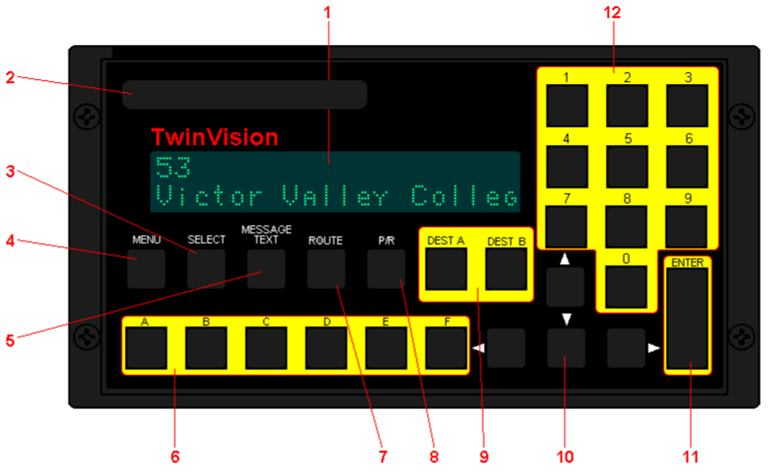
Key/Indicator Function
- Message display.
- Flashcard Port Used to insert PCMCIA card to update programming.
- SELECT - Not used.
- MENU - Not used.
- MESSAGE TEXT - Not used.
- A through F - Not used.
- ROUTE - Press to enter block number.
- P/R - Press to enter public relations message code.
- DEST A and DEST B - Press respective button to enter destination code or to recall previous message.
- Up, Down, Left, Right Arrow keys.
- ENTER - To enter selected message code.
- 0 through 9 - Used to enter message codes.
To Enter A Destination
Note: Two destination codes may be stored (DEST A and DEST B) for later retrival. To retrive, press eithe DEST A or DEST B, then enter.
- Press either DEST A or DESt B.
- Enter the code for the destination.
- Press ENTER.
Note: Two destination codes may be stored (DEST A and DEST B) for later retrival. To retrive, press eithe DEST A or DEST B, then enter.
To Enter A P/R Message
P/R message will alternate with destination.
P/R message will alternate with destination.
- Press P/R.
- Enter the P/R code.
- Press ENTER.
- To clear the PR, enter 0 for the code.
To Enter A Block Number
- Press ROUTE.
- Press 2 for Run Number.
- Press ENTER.
- Enter 4 digit block number.
- Press ENTER.
- Enter 0 to clear block number.