Hanover ERIC++
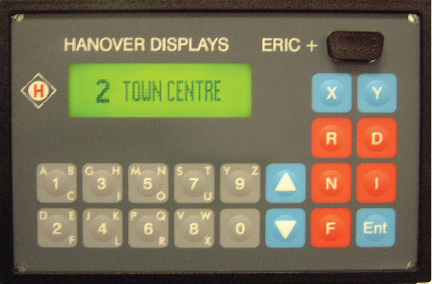
Key/Indicator Function
- Message display.
- KeyLow port to update programming.
- 0 through 9 - Used to enter message codes.
- Up and Down arrows - Not used.
- X and Y - Press respective button to enter destination message code or to recall previous message.
- R - Press to enter block number in dash sign in windshield.
- D - Not used.
- N - Not used
- I - Press to enter public relations message code.
- F - Not used.
- Ent - To enter selected message code.
To Enter A Destination
Note: Two destination codes may be stored (X and Y) for later retrival. To retrive, press either X or Y, then enter.
- Press either X or Y.
- Enter the code for the destination.
- Press Ent.
Note: Two destination codes may be stored (X and Y) for later retrival. To retrive, press either X or Y, then enter.
To Enter A P/R Message
P/R message will alternate with destination.
P/R message will alternate with destination.
- Press I.
- Enter the P/R code.
- Press Ent.
- To clear the PR, enter 0 for the code.
To Enter A Block Number
- Press R.
- Enter 4 digit block number.
- Press Ent.
- Enter 0 to clear block number.